Codeymon / download / sidekik
Free · v0.1.1 · Beta

Your tablet is now a second screen.

Sidekik turns an Android tablet into a real extended display for your Mac. Plug in a USB cable for monitor-like latency, or go wireless over Wi-Fi. Touch it, drag windows to it, launch apps from it.

You need both: the app for your computer and the app for your tablet. All downloads ↓ · Read the user guide →

Sidekik logo: a Mac screen and a winking orange tablet kicking a leg out USB · ~3 ms round trip 120 fps · touch
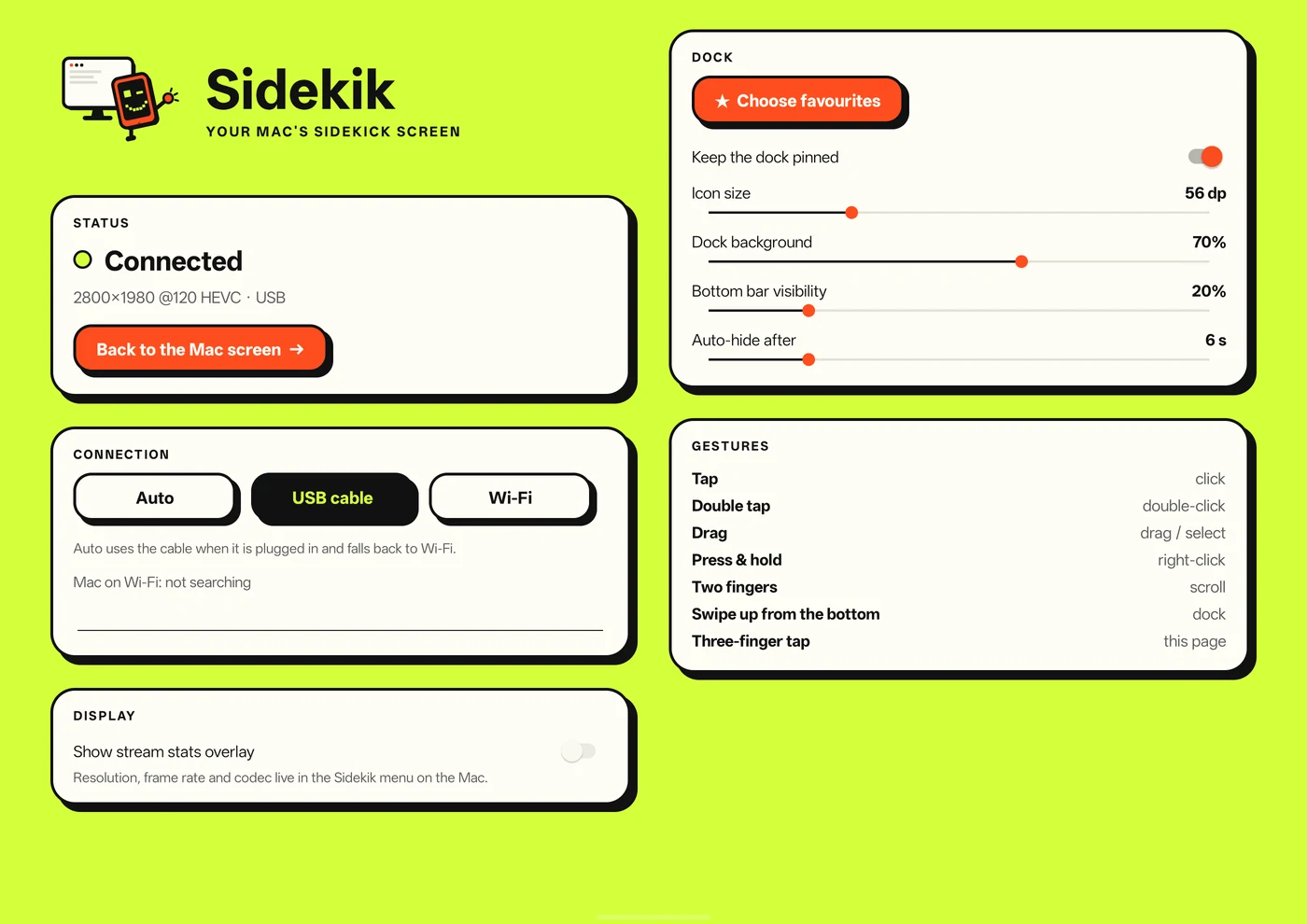
The Sidekik home page on a tablet: status Connected over USB, connection mode buttons, dock settings and the gesture list
  • A real monitor, not a mirrormacOS gets a new display at your tablet's full resolution. Arrange it in System Settings like any screen.
  • Everything in one placeThe tablet's home page shows the link, lets you switch USB / Wi-Fi and tunes the dock.
  • Made for your fingersTap to click, drag windows, hold for right-click, two fingers to scroll.

Up and running in three steps.

Two small apps talk to each other: one on your computer, one on your tablet. No sign-up.

Install on your Mac

Unzip, drag Sidekik to Applications and open it. Allow Screen Recording and Accessibility when macOS asks. It lives in the menu bar.

Install on your tablet

Install the Android app (Android 11 or newer). For USB, turn on Developer options → USB debugging.

Connect

Plug in a data cable, or open Sidekik on the tablet on the same Wi-Fi. Your desktop appears in a second or two.

Downloads

Version 0.1.1 · released 19 Nov 2026. Install the computer app and the tablet app.

Recommended

Sidekik for Mac

0.1.1 · universal · 0.6 MB
  • macOS 14 Sonoma or newer
  • Apple silicon or Intel

Recommended: paste into Terminal. Installs to Applications with no security prompt and adds adb for USB if needed.

curl -fsSL https://codeymon.com/download/sidekik/install.sh | bash
or with Homebrew
brew install --cask codewithgauri/tap/sidekik
or download
Download .zip

The .zip needs a one-time approval: open it, then System Settings → Privacy & Security → Open Anyway.

SHA-256
3cbd2d4fe3ce0e7a93f6bc1040454417802305755c2e0325467f1ec67ae97b4f
Needed on the tablet

Sidekik for Android

0.1.1 · tablet app · 2.7 MB
  • Android 11 or newer, tablet or phone
  • Hardware H.264 decoder (every modern tablet)
  • Allow "install unknown apps" for your browser

Easiest: plug the tablet in (USB debugging on) before running the Mac or Windows command, and it offers to install the tablet app for you.

Download APK .apk
SHA-256
d2fa07b3f166b40a5c178854ff441fc4fe52ea7460fcc84bec665334dd007a37
Early beta

Sidekik for Windows

0.1.1 · x64 · 72 MB
  • Windows 10 (2004) or Windows 11, 64-bit
  • A virtual display driver for a true extended screen (see setup)
  • New and not yet field-tested: tell us how it goes

Recommended: paste into PowerShell (Start → type "PowerShell"). Installs for your user, no admin, no SmartScreen prompt.

irm https://codeymon.com/download/sidekik/install.ps1 | iex
or with Scoop
scoop bucket add codeymon https://github.com/codewithgauri/scoop-bucket scoop install codeymon/sidekik
or download
Download .zip

If SmartScreen warns about the .exe: More info → Run anyway.

SHA-256
70cbef8adfe1bf9107a0fda9230150f53b6c29c8c12b7758ab808b1185ab5039

Small app. Serious display.

Built for the lowest latency the hardware allows, then made fun to use.

Monitor-like latency

Hardware encode on the computer, hardware decode on the tablet, and flow control that never lets lag build up.

USB or Wi-Fi

Automatic mode uses the cable when it's plugged in and Wi-Fi otherwise. Switch from the Mac menu or the tablet.

Touch & stylus

Tap, double-tap, drag, press-and-hold for right-click, two-finger scroll. A stylus works as a precise pointer.

Quick-launch dock

Swipe up for a dock of your favourite apps and sites. Tap to open on the tablet; hold for minimize or quit.

Sharp, Retina-style

Native, Balanced and Fast modes, 60 or 120 fps, H.264 or HEVC. Pick sharpness or speed from the menu bar.

Private by design

Your screen goes straight from your computer to your tablet. No account, no cloud, no analytics.

~3 msUSB round trip
10 mstablet decode → screen
120fps on 120 Hz panels
2800×1980full panel resolution

Measured on a OnePlus Pad Go 2 with an Apple-silicon MacBook Pro. Wi-Fi adds a few milliseconds and depends on your router.

Setup help

Most questions have a one-line answer. For everything else, read the full user guide.

macOS says "Sidekik Not Opened" or "Apple could not verify Sidekik"

That's macOS Gatekeeper: Sidekik isn't notarized by Apple yet. Two ways around it:

  • Easiest: install with the Terminal command instead of the .zip. Nothing to approve:
curl -fsSL https://codeymon.com/download/sidekik/install.sh | bash
  • Already downloaded the .zip? Click Done, open System Settings → Privacy & Security, scroll down and click Open Anyway next to "Sidekik", then confirm. On macOS 15 and later, Control-click → Open no longer skips this.
Which permissions does the Mac app need?

Screen Recording to show your screen on the tablet, and Accessibility so touches on the tablet can click on the Mac. Both are asked for on first launch; quit and reopen Sidekik after granting Screen Recording.

How do I connect over USB?

USB uses Android's debug bridge (adb). On the Mac install it once:

brew install --cask android-platform-tools

(The Terminal installer above does this for you if adb is missing.)

On the tablet: Settings → About tablet → tap Build number seven times, then Developer options → USB debugging on. Plug in a data cable and accept "Allow USB debugging". Sidekik sets up the tunnel and opens the tablet app for you.

The cable is plugged in but it still waits for USB

Another program is holding the tablet's USB connection. The usual culprit is a phone-sync app such as O+ Connect; quit or uninstall it. A second copy of adb started by another tool can do the same. Pick Auto on the tablet's home page and Sidekik uses Wi-Fi in the meantime.

How do I use it over Wi-Fi?

Put both devices on the same network and open Sidekik on each. The tablet finds the computer by itself. If your network blocks discovery, type the computer's IP on the tablet's home page; the Mac menu shows it under Connection.

Windows: why do I need a virtual display driver?

Install with irm https://codeymon.com/download/sidekik/install.ps1 | iex in PowerShell, or with Scoop (see Downloads). Windows has no built-in way for an app to add a monitor. Install the free, signed Virtual Display Driver once and Sidekik streams it as a true extended screen. Without it, Sidekik streams a second monitor if you have one, or mirrors your main screen. Allow Sidekik on private networks when the firewall asks. The PowerShell installer adds adb for USB if it's missing.

Tablet gestures

Tap = click · double tap = double-click · drag = drag · press and hold = right-click · two fingers = scroll · swipe up from the bottom = dock · three-finger tap = Sidekik home page. Hold any dock icon for minimize, quit or remove.

Is it really free? What data do you collect?

Free, no account, no ads. Nothing is sent to us: the picture and your touches travel only between your computer and your tablet over the cable or your own network.